
Microsoft Development Training Classes in Harlingen, Texas
Learn Microsoft Development in Harlingen, Texas and surrounding areas via our hands-on, expert led courses. All of our classes either are offered on an onsite, online or public instructor led basis. Here is a list of our current Microsoft Development related training offerings in Harlingen, Texas: Microsoft Development Training
Microsoft Development Training Catalog
.NET Classes
Azure Classes
BizTalk Server Classes
Cloud Classes
JavaScript Classes
Course Directory [training on all levels]
- .NET Classes
- Agile/Scrum Classes
- AI Classes
- Ajax Classes
- Android and iPhone Programming Classes
- Azure Classes
- Blaze Advisor Classes
- C Programming Classes
- C# Programming Classes
- C++ Programming Classes
- Cisco Classes
- Cloud Classes
- CompTIA Classes
- Crystal Reports Classes
- Data Classes
- Design Patterns Classes
- DevOps Classes
- Foundations of Web Design & Web Authoring Classes
- Git, Jira, Wicket, Gradle, Tableau Classes
- IBM Classes
- Java Programming Classes
- JBoss Administration Classes
- JUnit, TDD, CPTC, Web Penetration Classes
- Linux Unix Classes
- Machine Learning Classes
- Microsoft Classes
- Microsoft Development Classes
- Microsoft SQL Server Classes
- Microsoft Team Foundation Server Classes
- Microsoft Windows Server Classes
- Oracle, MySQL, Cassandra, Hadoop Database Classes
- Perl Programming Classes
- Python Programming Classes
- Ruby Programming Classes
- SAS Classes
- Security Classes
- SharePoint Classes
- SOA Classes
- Tcl, Awk, Bash, Shell Classes
- UML Classes
- VMWare Classes
- Web Development Classes
- Web Services Classes
- Weblogic Administration Classes
- XML Classes
- DOCKER WITH KUBERNETES ADMINISTRATION
30 November, 2026 - 4 December, 2026 - RED HAT ENTERPRISE LINUX SYSTEMS ADMIN II
2 November, 2026 - 5 November, 2026 - RED HAT ENTERPRISE LINUX SYSTEMS ADMIN I
7 December, 2026 - 11 December, 2026 - RED HAT ENTERPRISE LINUX AUTOMATION WITH ANSIBLE
9 November, 2026 - 12 November, 2026 - AWS Certified Machine Learning: Specialty (MLS-C01)
2 November, 2026 - 6 November, 2026 - See our complete public course listing
Blog Entries publications that: entertain, make you think, offer insight
One of the biggest challenges in pursuing a career in software development is to figure out which language you want to work. In addition to commonly used software programming languages like C, C++, Java a lot of new programming languages such as Python, Ruby on Rails have surfaced especially because they are used by a lot of consumer based start-ups these days.
With so many front and back end languages, the choice of learning Java is a failsafe decision and mastering Java can ensure that you have a bright future in software programming.
What is Java
Java is a computer programming language that is designed to be platform independent meaning that the language can virtually run on any hardware platform. This platform independence and an object oriented framework make Java the preferred language of development especially for client-server web applications.
 In programming, memory leaks are a common issue, and it occurs when a computer uses memory but does not give it back to the operating system. Experienced programmers have the ability to diagnose a leak based on the symptoms. Some believe every undesired increase in memory usage is a memory leak, but this is not an accurate representation of a leak. Certain leaks only run for a short time and are virtually undetectable.
Memory Leak Consequences
Applications that suffer severe memory leaks will eventually exceed the memory resulting in a severe slowdown or a termination of the application.
How to Protect Code from Memory Leaks?
Preventing memory leaks in the first place is more convenient than trying to locate the leak later. To do this, you can use defensive programming techniques such as smart pointers for C++. A smart pointer is safer than a raw pointer because it provides augmented behavior that raw pointers do not have. This includes garbage collection and checking for nulls.
If you are going to use a raw pointer, avoid operations that are dangerous for specific contexts. This means pointer arithmetic and pointer copying. Smart pointers use a reference count for the object being referred to. Once the reference count reaches zero, the excess goes into garbage collection. The most commonly used smart pointer is shared_ptr from the TR1 extensions of the C++ standard library.
Static Analysis
The second approach to memory leaks is referred to as static analysis and attempts to detect errors in your source-code. CodeSonar is one of the effective tools for detection. It provides checkers for the Power of Ten coding rules, and it is especially competent at procedural analysis. However, some might find it lagging for bigger code bases.
How to Handle a Memory Leak
For some memory leaks, the only solution is to read through the code to find and correct the error. Another one of the common approaches to C++ is to use RAII, which an acronym for Resource Acquisition Is Initialization. This approach means associating scoped objects using the acquired resources, which automatically releases the resources when the objects are no longer within scope. RAII has the advantage of knowing when objects exist and when they do not. This gives it a distinct advantage over garbage collection. Regardless, RAII is not always recommended because some situations require ordinary pointers to manage raw memory and increase performance. Use it with caution.
The Most Serious Leaks
Urgency of a leak depends on the situation, and where the leak has occurred in the operating system. Additionally, it becomes more urgent if the leak occurs where the memory is limited such as in embedded systems and portable devices.
To protect code from memory leaks, people have to stay vigilant and avoid codes that could result in a leak. Memory leaks continue until someone turns the system off, which makes the memory available again, but the slow process of a leak can eventually prejudice a machine that normally runs correctly.
Related:

If you're someone who's interested in computer programming, chances are you've considered pursuing a career in it. However, being a computer programmer is definitely not for everyone, as it takes some special characteristics to succeed as a computer programmer.
Good at Math
While you don't have to be a math genius in order to be a good computer programmer, being good at math really does help. In general, as long as you know your trigonometry and advanced high school algebra, you should be set for programming.
However, in a few instances, knowledge of more advanced math ends up being necessary. For example, for shader programming, you should be familiar with integration of multiple variables, matrix algebra, and basic differentiation. You will also require considerable math skills in order to program 3D.
Excellent Problem Solver
To be a successful computer programmer, you definitely need to be an excellent problem solver. It is vital for a computer programmer to break a problem down into small parts. They must then be able to decide the best way to approach individual pieces of the problem. Computer programmers also need to know how to anticipate and prevent potential problems. While problem-solving, they also need to keep in mind things like user experience and performance.
If you're not a good problem solver, knowing a particular language and syntax will be useless if you can't even identify the problem at hand. Therefore, excellent problem solving skills are a critical foundation for computer programming.
Patience
If you are not a patient person, you will quickly become very frustrated with computer programming. Problem-solving is not always easy and fast. In fact, it may take a very long time, especially if you're either inexperienced or working on an especially hard project.
Debugging after the coding process is also very frustrating and tedious. No matter how hard you try, you will always have bugs in your coding, and these bugs, while often easy to fix, tend to be very difficult to detect. Therefore, you will end up spending a lot of your time searching for bugs that take very little time to fix.
Well-Rounded Skills
Generally, computer programmers who are very skilled in one area tend to stick around longer than jack-of-all-trades, as specialized programmers are harder to replace with outsourcing than general programmers. Therefore, it will do you well to specialize in one area of computer programming.
However, while specializing is good, you should still know at least a little about everything, especially skills that relate to the area you specialize in. For example, if you're a core Java programmer, you should know about SQL programming and ideally a scripting language or some regular expressions.
As you can see, not everyone has what it takes to pursue computer programming as a career and succeed at it. In fact, just because you love to program doesn't mean it's a good career choice for you. However, if you feel that you possess all the characteristics listed above, then you should definitely consider computer programming as a career.
A whole new world was thrown wide open with the advent of the concept of open source. The biggest advantage of open source projects is the easy availability of the source code and also the rights to tweak it or modify the code as we deem fit.
Listed below are some top open source projects that are making waves with their innovative ideas at this moment.
ProjectLibre
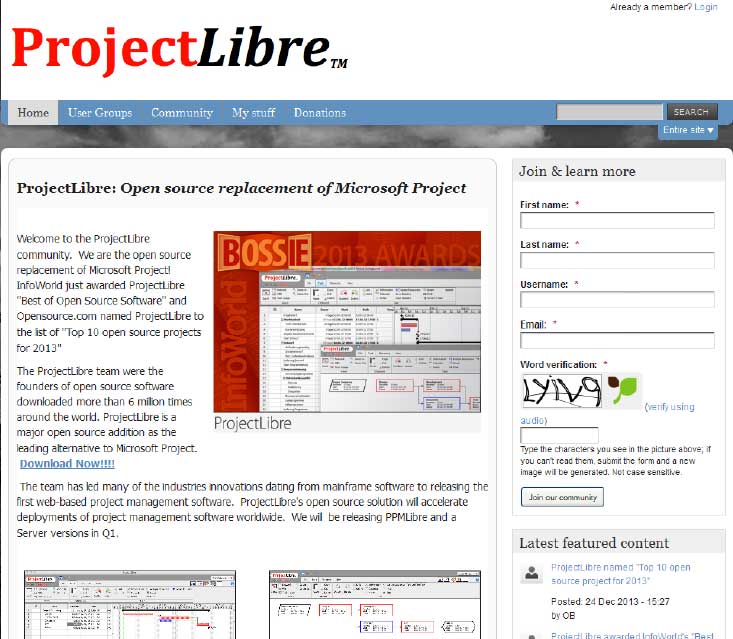 Project Libre is the open source replacement of Microsoft Project. It was one among the top 10 open source projects of 2013. With over 6 million downloads; it has most certainly captured the imagination of people around the world. Details of project Libre could be found at http://www.projectlibre.org/ . Project Libre has separate release for mainframes. It also has a web based version which further increases its overall appeal. One of the main advantages is that it has a list of tasks that can be tracked to closure. It can also be used in conjunction with LibreOffice to provide a great set of tools to the team leaders.
Diaspora
Tech Life in Texas
| Company Name | City | Industry | Secondary Industry |
|---|---|---|---|
| Dr Pepper Snapple Group | Plano | Manufacturing | Nonalcoholic Beverages |
| Western Refining, Inc. | El Paso | Energy and Utilities | Gasoline and Oil Refineries |
| Frontier Oil Corporation | Dallas | Manufacturing | Chemicals and Petrochemicals |
| ConocoPhillips | Houston | Energy and Utilities | Gasoline and Oil Refineries |
| Dell Inc | Round Rock | Computers and Electronics | Computers, Parts and Repair |
| Enbridge Energy Partners, L.P. | Houston | Transportation and Storage | Transportation & Storage Other |
| GameStop Corp. | Grapevine | Retail | Retail Other |
| Fluor Corporation | Irving | Business Services | Management Consulting |
| Kimberly-Clark Corporation | Irving | Manufacturing | Paper and Paper Products |
| Exxon Mobil Corporation | Irving | Energy and Utilities | Gasoline and Oil Refineries |
| Plains All American Pipeline, L.P. | Houston | Energy and Utilities | Gasoline and Oil Refineries |
| Cameron International Corporation | Houston | Energy and Utilities | Energy and Utilities Other |
| Celanese Corporation | Irving | Manufacturing | Chemicals and Petrochemicals |
| HollyFrontier Corporation | Dallas | Energy and Utilities | Gasoline and Oil Refineries |
| Kinder Morgan, Inc. | Houston | Energy and Utilities | Gas and Electric Utilities |
| Marathon Oil Corporation | Houston | Energy and Utilities | Gasoline and Oil Refineries |
| United Services Automobile Association | San Antonio | Financial Services | Personal Financial Planning and Private Banking |
| J. C. Penney Company, Inc. | Plano | Retail | Department Stores |
| Energy Transfer Partners, L.P. | Dallas | Energy and Utilities | Energy and Utilities Other |
| Atmos Energy Corporation | Dallas | Energy and Utilities | Alternative Energy Sources |
| National Oilwell Varco Inc. | Houston | Manufacturing | Manufacturing Other |
| Tesoro Corporation | San Antonio | Manufacturing | Chemicals and Petrochemicals |
| Halliburton Company | Houston | Energy and Utilities | Energy and Utilities Other |
| Flowserve Corporation | Irving | Manufacturing | Tools, Hardware and Light Machinery |
| Commercial Metals Company | Irving | Manufacturing | Metals Manufacturing |
| EOG Resources, Inc. | Houston | Energy and Utilities | Gasoline and Oil Refineries |
| Whole Foods Market, Inc. | Austin | Retail | Grocery and Specialty Food Stores |
| Waste Management, Inc. | Houston | Energy and Utilities | Waste Management and Recycling |
| CenterPoint Energy, Inc. | Houston | Energy and Utilities | Gas and Electric Utilities |
| Valero Energy Corporation | San Antonio | Manufacturing | Chemicals and Petrochemicals |
| FMC Technologies, Inc. | Houston | Energy and Utilities | Alternative Energy Sources |
| Calpine Corporation | Houston | Energy and Utilities | Gas and Electric Utilities |
| Texas Instruments Incorporated | Dallas | Computers and Electronics | Semiconductor and Microchip Manufacturing |
| SYSCO Corporation | Houston | Wholesale and Distribution | Grocery and Food Wholesalers |
| BNSF Railway Company | Fort Worth | Transportation and Storage | Freight Hauling (Rail and Truck) |
| Affiliated Computer Services, Incorporated (ACS), a Xerox Company | Dallas | Software and Internet | E-commerce and Internet Businesses |
| Tenet Healthcare Corporation | Dallas | Healthcare, Pharmaceuticals and Biotech | Hospitals |
| XTO Energy Inc. | Fort Worth | Energy and Utilities | Gasoline and Oil Refineries |
| Group 1 Automotive | Houston | Retail | Automobile Dealers |
| ATandT | Dallas | Telecommunications | Telephone Service Providers and Carriers |
| Anadarko Petroleum Corporation | Spring | Energy and Utilities | Gasoline and Oil Refineries |
| Apache Corporation | Houston | Energy and Utilities | Gasoline and Oil Refineries |
| Dean Foods Company | Dallas | Manufacturing | Food and Dairy Product Manufacturing and Packaging |
| American Airlines | Fort Worth | Travel, Recreation and Leisure | Passenger Airlines |
| Baker Hughes Incorporated | Houston | Energy and Utilities | Gasoline and Oil Refineries |
| Continental Airlines, Inc. | Houston | Travel, Recreation and Leisure | Passenger Airlines |
| RadioShack Corporation | Fort Worth | Computers and Electronics | Consumer Electronics, Parts and Repair |
| KBR, Inc. | Houston | Government | International Bodies and Organizations |
| Spectra Energy Partners, L.P. | Houston | Energy and Utilities | Gas and Electric Utilities |
| Energy Future Holdings | Dallas | Energy and Utilities | Energy and Utilities Other |
| Southwest Airlines Corporation | Dallas | Transportation and Storage | Air Couriers and Cargo Services |
training details locations, tags and why hsg
The Hartmann Software Group understands these issues and addresses them and others during any training engagement. Although no IT educational institution can guarantee career or application development success, HSG can get you closer to your goals at a far faster rate than self paced learning and, arguably, than the competition. Here are the reasons why we are so successful at teaching:
- Learn from the experts.
- We have provided software development and other IT related training to many major corporations in Texas since 2002.
- Our educators have years of consulting and training experience; moreover, we require each trainer to have cross-discipline expertise i.e. be Java and .NET experts so that you get a broad understanding of how industry wide experts work and think.
- Discover tips and tricks about Microsoft Development programming
- Get your questions answered by easy to follow, organized Microsoft Development experts
- Get up to speed with vital Microsoft Development programming tools
- Save on travel expenses by learning right from your desk or home office. Enroll in an online instructor led class. Nearly all of our classes are offered in this way.
- Prepare to hit the ground running for a new job or a new position
- See the big picture and have the instructor fill in the gaps
- We teach with sophisticated learning tools and provide excellent supporting course material
- Books and course material are provided in advance
- Get a book of your choice from the HSG Store as a gift from us when you register for a class
- Gain a lot of practical skills in a short amount of time
- We teach what we know…software
- We care…