
JBoss Administration Training Classes in Terre Haute, Indiana
Learn JBoss Administration in Terre Haute, Indiana and surrounding areas via our hands-on, expert led courses. All of our classes either are offered on an onsite, online or public instructor led basis. Here is a list of our current JBoss Administration related training offerings in Terre Haute, Indiana: JBoss Administration Training
JBoss Administration Training Catalog
JBoss Administration Classes
Java Enterprise Edition Classes
Java Programming Classes
Course Directory [training on all levels]
- .NET Classes
- Agile/Scrum Classes
- AI Classes
- Ajax Classes
- Android and iPhone Programming Classes
- Azure Classes
- Blaze Advisor Classes
- C Programming Classes
- C# Programming Classes
- C++ Programming Classes
- Cisco Classes
- Cloud Classes
- CompTIA Classes
- Crystal Reports Classes
- Data Classes
- Design Patterns Classes
- DevOps Classes
- Foundations of Web Design & Web Authoring Classes
- Git, Jira, Wicket, Gradle, Tableau Classes
- IBM Classes
- Java Programming Classes
- JBoss Administration Classes
- JUnit, TDD, CPTC, Web Penetration Classes
- Linux Unix Classes
- Machine Learning Classes
- Microsoft Classes
- Microsoft Development Classes
- Microsoft SQL Server Classes
- Microsoft Team Foundation Server Classes
- Microsoft Windows Server Classes
- Oracle, MySQL, Cassandra, Hadoop Database Classes
- Perl Programming Classes
- Python Programming Classes
- Ruby Programming Classes
- SAS Classes
- Security Classes
- SharePoint Classes
- SOA Classes
- Tcl, Awk, Bash, Shell Classes
- UML Classes
- VMWare Classes
- Web Development Classes
- Web Services Classes
- Weblogic Administration Classes
- XML Classes
- RED HAT ENTERPRISE LINUX AUTOMATION WITH ANSIBLE
9 November, 2026 - 12 November, 2026 - AWS Certified Machine Learning: Specialty (MLS-C01)
2 November, 2026 - 6 November, 2026 - RED HAT ENTERPRISE LINUX SYSTEMS ADMIN II
2 November, 2026 - 5 November, 2026 - RED HAT ENTERPRISE LINUX SYSTEMS ADMIN I
7 December, 2026 - 11 December, 2026 - DOCKER WITH KUBERNETES ADMINISTRATION
30 November, 2026 - 4 December, 2026 - See our complete public course listing
Blog Entries publications that: entertain, make you think, offer insight
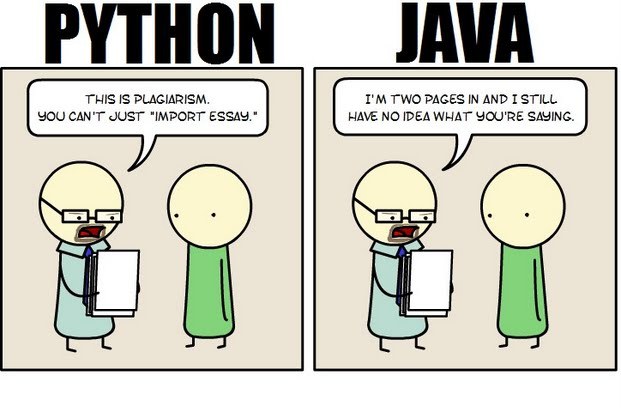 Java still has its place in the world of software development, but is it quickly becoming obsolete by the more dynamically enabled Python programming language? The issue is hotly contested by both sides of the debate. Java experts point out that Java is still being developed with more programmer friendly updates. Python users swear that Java can take up to ten times longer to develop. Managers that need to make the best decision for a company need concrete information so that an informed and rational decision can be made.
First, Java is a static typed language while Python is dynamically typed. Static typed languages require that each variable name must be tied to both a type and an object. Dynamically typed languages only require that a variable name only gets bound to an object. Immediately, this puts Python ahead of the game in terms of productivity since a static typed language requires several elements and can make errors in coding more likely.
Python uses a concise language while Java uses verbose language. Concise language, as the name suggests, gets straight to the point without extra words. Removing additional syntax can greatly reduce the amount of time required to program. A simple call in Java, such as the ever notorious "Hello, World" requires three several lines of coding while Python requires a single sentence. Java requires the use of checked exceptions. If the exceptions are not caught or thrown out then the code fails to compile. In terms of language, Python certainly has surpassed Java in terms of brevity.
Additionally, while Java's string handling capabilities have improved they haven't yet matched the sophistication of Python's. Web applications rely upon fast load times and extraneous code can increase user wait time. Python optimizes code in ways that Java doesn't, and this can make Python a more efficient language. However, Java does run faster than Python and this can be a significant advantage for programmers using Java. When you factor in the need for a compiler for Java applications the speed factor cancels itself out leaving Python and Java at an impasse.
While a programmer will continue to argue for the language that makes it easiest based on the programmer's current level of knowledge, new software compiled with Python takes less time and provides a simplified coding language that reduces the chance for errors. When things go right, Java works well and there are no problems. However, when errors get introduced into the code, it can become extremely time consuming to locate and correct those errors. Python generally uses less code to begin with and makes it easier and more efficient to work with.
Ultimately, both languages have their own strengths and weaknesses. For creating simple applications, Python provides a simpler and more effective application. Larger applications can benefit from Java and the verbosity of the code actually makes it more compatible with future versions. Python code has been known to break with new releases. Ultimately, Python works best as a type of connecting language to conduct quick and dirty work that would be too intensive when using Java alone. In this sense, Java is a low-level implementation language. While both languages are continuing to develop, it's unlikely that one language will surpass the other for all programming needs in the near future.
Recently, I asked my friend, Ray, to list those he believes are the top 10 most forward thinkers in the IT industry. Below is the list he generated.
Like most smart people, Ray gets his information from institutions such as the New York Times, the Wall Street Journal, the Huffington Post, Ted Talks ... Ray is not an IT expert; he is, however, a marketer: the type that has an opinion on everything and is all too willing to share it. Unfortunately, many of his opinions are based upon the writings/editorials of those attempting to appeal to the reading level of an 8th grader. I suppose it could be worse. He could be referencing Yahoo News, where important stories get priority placement such as when the voluptuous Kate Upton holds a computer close to her breasts.
Before you read further, note that missing from this list and not credited are innovators: Bill Joy, Dennis Ritchie, Linus Torvalds, Alan Turing, Edward Howard Armstrong, Peter Andreas Grunberg and Albert Fent, Gottfried Wilhelm Leibniz/Hermann Grassmann ... You know the type: the type of individual who burns the midnight oil and rarely, if ever, guffaws over their discoveries or achievements.

Yahoo answers abstract.
Overview:
· Virus is a piece of code that is secretly introduced into a system in order to corrupt it or destroy data
 Google is one of the most popular websites in the entire world that gets millions of views each day. Therefore, it should come as no surprise that it needs a strong and reliable programming language that it can rely on to run its searches and many of the apps that Google has created. Because of this, Google uses Python to ensure that every time a user uses one of their products, it will work smoothly and flawlessly. That being said, Google uses Python in a variety of different ways, outlined below.
Code.Google.Com
Since its creation, Google has always used Python as part of its core for programming language. This can still be seen today considering the strong relationship the two have with one another. Google supports and sponsors various Python events, and Python works to better itself so that Google remains on top of cutting edge material. One way that they do this is by working with code.google.com. This is the place where Google developers go to code, learn to code and test programs. And with it being built on Python, users can experience exactly what it is that they should expect once they start using the real site.
Google AdWords
Google AdWords is a great way for people to get their websites out there, through the use of advertising. Each time a person types in a certain string of keywords, or if they have history in their cookies, then they’ll come across these AdWords. The way that these AdWords are broadcasted to online web surfers is built on the foundation from Python. Python also helps clients access their AdWord accounts, so that they can tailor where they want their advertisements to go.
Beets
If you have loads of music, but some of it is uncategorized or sitting in a music player without a name or title, Beets is for you. This Google project uses Python and a music database to help arrange and organize music. The best part about Beets is that even if it doesn’t run exactly the way that you want, you can use a bit of Python knowledge to tailor it to be more specific to your desires.
Android-Scripting
Not only does Google run off Python, but Android also has its own value for the language. Whether you are someone who is just creating your own app for your phone or if you are someone who is looking to create the next app that gets downloaded multiple millions of times, you can use Python and Android-Scripting to create an app that does exactly what you want it to do.
YouTube
YouTube one just started as a video viewer on its own, but is now a billion-dollar company that is owned by Google. YouTube uses Python to let users view and upload video, share links, embed video and much more. Much like Google itself, YouTube relies heavily on Python to run seamlessly for the amount of traffic it gets daily.
Python is not your average coding language. Instead, it is a valuable and integral part of some of the biggest websites in the world, one of which is Google. And the resources listed here are just a fraction of what Google uses Python for in total.
Related:
What Are The 10 Most Famous Software Programs Written in Python?
The Future of Java and Python
Ranking Programming Languages: Which are Gaining Popularity?
Top 10 Software Skills for 2014 and Beyond
Working With Strings In Python
Working With Lists In Python
Conditional Programming In Python
Tech Life in Indiana
training details locations, tags and why hsg
The Hartmann Software Group understands these issues and addresses them and others during any training engagement. Although no IT educational institution can guarantee career or application development success, HSG can get you closer to your goals at a far faster rate than self paced learning and, arguably, than the competition. Here are the reasons why we are so successful at teaching:
- Learn from the experts.
- We have provided software development and other IT related training to many major corporations in Indiana since 2002.
- Our educators have years of consulting and training experience; moreover, we require each trainer to have cross-discipline expertise i.e. be Java and .NET experts so that you get a broad understanding of how industry wide experts work and think.
- Discover tips and tricks about JBoss Administration programming
- Get your questions answered by easy to follow, organized JBoss Administration experts
- Get up to speed with vital JBoss Administration programming tools
- Save on travel expenses by learning right from your desk or home office. Enroll in an online instructor led class. Nearly all of our classes are offered in this way.
- Prepare to hit the ground running for a new job or a new position
- See the big picture and have the instructor fill in the gaps
- We teach with sophisticated learning tools and provide excellent supporting course material
- Books and course material are provided in advance
- Get a book of your choice from the HSG Store as a gift from us when you register for a class
- Gain a lot of practical skills in a short amount of time
- We teach what we know…software
- We care…