
Web Development Training Classes in Washington D C, Virginia
Learn Web Development in Washington D C, Virginia and surrounding areas via our hands-on, expert led courses. All of our classes either are offered on an onsite, online or public instructor led basis. Here is a list of our current Web Development related training offerings in Washington D C, Virginia: Web Development Training
Web Development Training Catalog
Course Directory [training on all levels]
- .NET Classes
- Agile/Scrum Classes
- AI Classes
- Ajax Classes
- Android and iPhone Programming Classes
- Azure Classes
- Blaze Advisor Classes
- C Programming Classes
- C# Programming Classes
- C++ Programming Classes
- Cisco Classes
- Cloud Classes
- CompTIA Classes
- Crystal Reports Classes
- Data Classes
- Design Patterns Classes
- DevOps Classes
- Foundations of Web Design & Web Authoring Classes
- Git, Jira, Wicket, Gradle, Tableau Classes
- IBM Classes
- Java Programming Classes
- JBoss Administration Classes
- JUnit, TDD, CPTC, Web Penetration Classes
- Linux Unix Classes
- Machine Learning Classes
- Microsoft Classes
- Microsoft Development Classes
- Microsoft SQL Server Classes
- Microsoft Team Foundation Server Classes
- Microsoft Windows Server Classes
- Oracle, MySQL, Cassandra, Hadoop Database Classes
- Perl Programming Classes
- Python Programming Classes
- Ruby Programming Classes
- SAS Classes
- Security Classes
- SharePoint Classes
- SOA Classes
- Tcl, Awk, Bash, Shell Classes
- UML Classes
- VMWare Classes
- Web Development Classes
- Web Services Classes
- Weblogic Administration Classes
- XML Classes
- AWS Certified Machine Learning: Specialty (MLS-C01)
2 November, 2026 - 6 November, 2026 - RED HAT ENTERPRISE LINUX SYSTEMS ADMIN II
2 November, 2026 - 5 November, 2026 - OPENSHIFT ADMINISTRATION
19 October, 2026 - 21 October, 2026 - RED HAT ENTERPRISE LINUX AUTOMATION WITH ANSIBLE
9 November, 2026 - 12 November, 2026 - RED HAT ENTERPRISE LINUX SYSTEMS ADMIN I
26 October, 2026 - 30 October, 2026 - See our complete public course listing
Blog Entries publications that: entertain, make you think, offer insight
The job market is extremely tight these days, with several qualified workers being available for each empty position. That means that should you find yourself looking for work, for whatever reason, you need to make sure your interview skills are up to snuff. We will be taking a look at a variety of different tips that will help ensure your success during the interview process, including how to make sure your employers know about your C training experience. Here are some others:
- Do your own research in advance – Before you even step through the doorway to initiate the application process with a company, you should already know quite a bit about it. Investigate the corporate culture, speak with contacts who have experience with the firm, or search online; however you do it, having as much information as possible can really help you get an advantage during the hiring process. If you have specific experience, such as C training, that is of exceptional value to the firm you are applying to you can market yourself more effectively to the hiring agent.
- Dress Appropriately – In a perfect world, programming skill and experience such as C training should be the only factors in consideration when looking at a prospective hire; in real life this is often not the case. Don’t miss out because you gave a bad impression to someone, and strive to look your absolute best during your job interview. It is unfortunate, but the IT industry in particular tends to have a reputation for lacking in this department, so breaking the mold can be of great benefit to you.
- Be ready to interview at all times – You may be surprised how often job candidates are asked to participate in an off-the-cuff phone interview on the spot. Same-day in person interviews also are rising in popularity. Make sure you are always able to respond quickly if these situations come up and you get a fast interview. Memorize a few points in advance you can use to pump yourself up, such as an anecdote about your C training or other particular skills you may possess.
Job interviews are notoriously stressful for many people. Using simple tips like these can help you to prepare in advance for situations you may encounter during the interview process, and help you ultimately secure that new job. Make sure to emphasize whatever makes you special as an individual, such as your extensive C training.
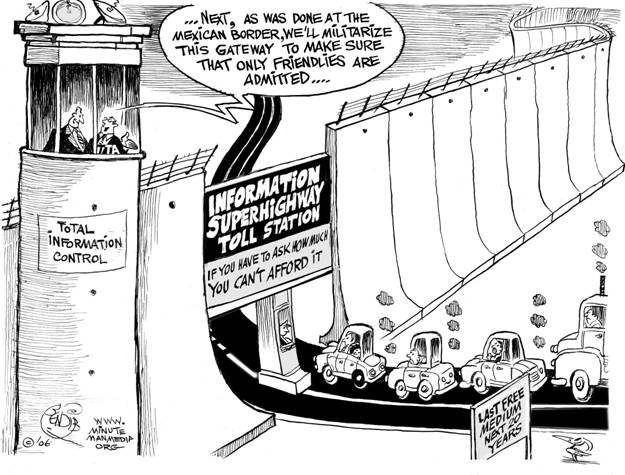
Net Neutrality
You may have heard about net neutrality over the years. Recently, the concept has gone through some changes, and many would consider its underlying principles to be in danger of corruption or dissolution. However, the technical nature of net neutrality ethics makes it difficult to understand for the layperson. Read on, and the central themes and controversies surrounding the principle will be outlined and explained for your convenience.
The Theme
 Globalization
Globalization is the fundamental force changing IT service delivery and business's competitive activities in almost every vertical market — and thus economies — in some way, shape or form. One might say that globalization is not a new trend and has been commonplace for quite some time now. Yes, but with the changing economic environment globalizations has special implications for the IT outsourcing industry. With developed countries like the U.S. keeping a strict eye on generating local jobs, IT outsourcing especially in Asian countries such as India and China is expected to see globalization brining in big shifts in business strategy
Potential Impact of Globalization
· Increase in near shoring in addition to outsourcing. Near shoring essentially refers to existing IT companies setting up development/delivery centers in Nordic and South American regions in order to offer same time zone services and also bypass the laws governing local hiring
· A truly global delivery model. Service delivery models will have to become more efficient and flexible and work well even if service teams spread across continents
This will mean that large IT outsourcing companies such as TCS will have to expand their presence globally from just having sales offices to actual delivery teams shipping out solutions.
 Big data is now in an incredibly important part of how many major businesses function. Data analysis, or the finding of facts from large volumes of data, helps businesses make many of their important decisions. Companies that conduct business on a national or international scale rely on big data in order to plot the general direction of their business. The concept of big data can be very confusing due to the sheer scale of information involved. By following a few simple guidelines, even the layman can understand big data and its impacts on everyday life.
What Exactly is Big Data?
Just about everyone can understand the concept of data. Data is information, and information is everywhere in the modern world. Anytime you use any piece of technology you are making use of data. Anytime you read a book, skim the newspaper or listen to music you are also making use of data. Your brain interprets and organizes data constantly from your senses and your thoughts.
Big data, much like its name infers, simply describes this same data on a large sale. The internet allowed the streaming, sharing and collecting of data on a scale never before imaginable and storage technology has allowed ever increasing hoards of data to be accumulated. In order for something to be considered “big data” it must be at least 10 terabytes or more of information. To put that in perspective, consider that 10 terabytes represents the entire printed collection of material in the Library of Congress. What’s even more remarkable is that many businesses work with far more than the minimum 10 terabytes of data. UPS stores over 16 petabytes of data about its packages and customers. That’s 16,000 terabytes or the equivalent to 1,600 printed libraries of congress. The sheer amount of that data is nearly impossible for a human to comprehend, and analysis of this data is only possible with computers.
How do Big Data Companies Emerge?
All of this information comes from everywhere on the internet. The majority of the useful data includes customer information, search engine logs, and entries on social media networks to name a few. This data is constantly generated by the internet at insane rates. Specified computers and software programs are created and operated by big data companies that collect and sort this information. These programs and hardware are so sophisticated and so specialized that entire companies can be dedicated to analyzing this data and then selling it to other companies. The raw data is distilled down into manageable reports that company executives can make use of when handling business decisions.
The Top Five:
These are the five biggest companies, according to Forbes, in the business of selling either raw data reports or analytics programs that help companies to compile their own reports.
1. Splunk
Splunk is currently valued at $186 million. It is essentially a program service that allows companies to turn their own raw data collections into usable information.
2. Opera Solutions
Opera Solutions is valued at $118 million. It serves as a data science service that helps other companies to manage the raw data that pertains to them. They can offer either direct consultation or cloud-based service.
3. Mu Sigma
Mu Sigma is valued at $114 million. It is a slightly smaller version of Opera Solutions, offering essentially the same types of services.
4. Palantir
Palantir is valued at $78 million. It offers data analysis software to companies so they can manage their own raw data analysis.
5. Cloudera
Cloudera is valued at $61 million. It offers services, software and training specifically related to the Apahce Hadoop-based programs.
The software and services provided by these companies impact nearly all major businesses, industries and products. They impact what business offer, where they offer them and how they advertise them to consumers. Every advertisement, new store opening or creation of a new product is at least somewhat related to big data analysis. It is the directional force of modern business.
Sources:
http://www.sas.com/en_us/insights/big-data/what-is-big-data.html
http://www.forbes.com/sites/gilpress/2013/02/22/top-ten-big-data-pure-plays/
http://www.whatsabyte.com/
Related:
Top Innovative Open Source Projects Making Waves in The Technology World
Is the U.S. the Leading Software Development Country?
How to Keep On Top Of the Latest Trends in Information Technology
Tech Life in Virginia
| Company Name | City | Industry | Secondary Industry |
|---|---|---|---|
| Brink's Inc. | Richmond | Business Services | Security Services |
| Federal Home Loan Mortgage Corporation (Freddie Mac) | Mc Lean | Financial Services | Lending and Mortgage |
| General Dynamics Corporation | Falls Church | Manufacturing | Aerospace and Defense |
| CarMax, Inc. | Henrico | Retail | Automobile Dealers |
| NVR, Inc. | Reston | Real Estate and Construction | Construction and Remodeling |
| Gannett Co., Inc. | Mc Lean | Media and Entertainment | Newspapers, Books and Periodicals |
| Smithfield Foods, Inc. | Smithfield | Manufacturing | Food and Dairy Product Manufacturing and Packaging |
| ManTech International Corporation | Fairfax | Computers and Electronics | IT and Network Services and Support |
| DynCorp International | Falls Church | Manufacturing | Aerospace and Defense |
| Genworth Financial, Inc. | Richmond | Financial Services | Insurance and Risk Management |
| MeadWestvaco Corporation | Richmond | Manufacturing | Paper and Paper Products |
| Dollar Tree, Inc. | Chesapeake | Retail | Department Stores |
| Alpha Natural Resources, Inc. | Abingdon | Agriculture and Mining | Mining and Quarrying |
| SRA International, Inc. | Fairfax | Business Services | Business Services Other |
| NII Holdings, Inc. | Reston | Telecommunications | Wireless and Mobile |
| Dominion Resources, Inc. | Richmond | Energy and Utilities | Gas and Electric Utilities |
| Norfolk Southern Corporation | Norfolk | Transportation and Storage | Freight Hauling (Rail and Truck) |
| CACI International Inc. | Arlington | Software and Internet | Data Analytics, Management and Storage |
| Amerigroup Corporation | Virginia Beach | Financial Services | Insurance and Risk Management |
| Owens and Minor, Inc. | Mechanicsville | Healthcare, Pharmaceuticals and Biotech | Personal Health Care Products |
| Advance Auto Parts, Inc | Roanoke | Retail | Automobile Parts Stores |
| SAIC | Mc Lean | Software and Internet | Software |
| AES Corporation | Arlington | Energy and Utilities | Gas and Electric Utilities |
| Capital One Financial Corporation | Mc Lean | Financial Services | Credit Cards and Related Services |
| Sunrise Senior Living, Inc. | Mc Lean | Healthcare, Pharmaceuticals and Biotech | Residential and Long-Term Care Facilities |
| Computer Sciences Corporation | Falls Church | Software and Internet | Software |
| Altria Group, Inc. | Richmond | Manufacturing | Manufacturing Other |
| Northrop Grumman Corporation | Falls Church | Manufacturing | Aerospace and Defense |
| Alliant Techsystems Inc. | Arlington | Manufacturing | Aerospace and Defense |
| Markel Corporation | Glen Allen | Financial Services | Insurance and Risk Management |
training details locations, tags and why hsg
The Hartmann Software Group understands these issues and addresses them and others during any training engagement. Although no IT educational institution can guarantee career or application development success, HSG can get you closer to your goals at a far faster rate than self paced learning and, arguably, than the competition. Here are the reasons why we are so successful at teaching:
- Learn from the experts.
- We have provided software development and other IT related training to many major corporations in Virginia since 2002.
- Our educators have years of consulting and training experience; moreover, we require each trainer to have cross-discipline expertise i.e. be Java and .NET experts so that you get a broad understanding of how industry wide experts work and think.
- Discover tips and tricks about Web Development programming
- Get your questions answered by easy to follow, organized Web Development experts
- Get up to speed with vital Web Development programming tools
- Save on travel expenses by learning right from your desk or home office. Enroll in an online instructor led class. Nearly all of our classes are offered in this way.
- Prepare to hit the ground running for a new job or a new position
- See the big picture and have the instructor fill in the gaps
- We teach with sophisticated learning tools and provide excellent supporting course material
- Books and course material are provided in advance
- Get a book of your choice from the HSG Store as a gift from us when you register for a class
- Gain a lot of practical skills in a short amount of time
- We teach what we know…software
- We care…