
Ajax Training Classes in Eau Claire, Wisconsin
Learn Ajax in Eau Claire, Wisconsin and surrounding areas via our hands-on, expert led courses. All of our classes either are offered on an onsite, online or public instructor led basis. Here is a list of our current Ajax related training offerings in Eau Claire, Wisconsin: Ajax Training
Course Directory [training on all levels]
- .NET Classes
- Agile/Scrum Classes
- AI Classes
- Ajax Classes
- Android and iPhone Programming Classes
- Azure Classes
- Blaze Advisor Classes
- C Programming Classes
- C# Programming Classes
- C++ Programming Classes
- Cisco Classes
- Cloud Classes
- CompTIA Classes
- Crystal Reports Classes
- Data Classes
- Design Patterns Classes
- DevOps Classes
- Foundations of Web Design & Web Authoring Classes
- Git, Jira, Wicket, Gradle, Tableau Classes
- IBM Classes
- Java Programming Classes
- JBoss Administration Classes
- JUnit, TDD, CPTC, Web Penetration Classes
- Linux Unix Classes
- Machine Learning Classes
- Microsoft Classes
- Microsoft Development Classes
- Microsoft SQL Server Classes
- Microsoft Team Foundation Server Classes
- Microsoft Windows Server Classes
- Oracle, MySQL, Cassandra, Hadoop Database Classes
- Perl Programming Classes
- Python Programming Classes
- Ruby Programming Classes
- SAS Classes
- Security Classes
- SharePoint Classes
- SOA Classes
- Tcl, Awk, Bash, Shell Classes
- UML Classes
- VMWare Classes
- Web Development Classes
- Web Services Classes
- Weblogic Administration Classes
- XML Classes
- RED HAT ENTERPRISE LINUX SYSTEMS ADMIN II
2 November, 2026 - 5 November, 2026 - AWS Certified Machine Learning: Specialty (MLS-C01)
2 November, 2026 - 6 November, 2026 - RED HAT ENTERPRISE LINUX SYSTEMS ADMIN I
7 December, 2026 - 11 December, 2026 - RED HAT ENTERPRISE LINUX AUTOMATION WITH ANSIBLE
9 November, 2026 - 12 November, 2026 - DOCKER WITH KUBERNETES ADMINISTRATION
30 November, 2026 - 4 December, 2026 - See our complete public course listing
Blog Entries publications that: entertain, make you think, offer insight
Jeff Nelson, a former Googler and inventor of Chromebook says on Quora, “One habit I've clung to is writing small prototypes when I'm trying to learn new concepts.
For example, I'll sit down with a book or a web page, and over the course of a few hours, write 30 or 40 programs all of them only a few dozen lines long. Each program intended to demonstrate some simple concept. This prototyping makes it very easy to try out many concepts in a short period of time.”
Miguel Paraz, Software Engineering Student habit is to “keep a log in a text file or document on my work computer. Before trying to solve a problem, I write it down first. And then I describe the details as they happen.”
 In May 2012 Google Chrome hit a milestone. It kicked Microsoft's Internet Explorer into excess phone oh that oh that second place as the most used browser on planet Earth.
With Microsoft being in second place, it makes a dark hole for Firefox coming in at number three. Google likes to trumpet three key reasons: security, simplicity and speed.
Available for free on Android, Linux, Mac, and Windows. It gets its speed from the open source JavaScript engine written in C++ known as V8.
In my daily use I use Microsoft's Internet Explorer version 10, Apple's Safari (on OS X) and chrome on both Windows 8 and OS X.
Admittedly people do not know anything about Internet Explorer version 10 since you can only get it on Windows 8/RT.
I do not need a crystal ball to know that the Mother of All Browser Battles is set to begin in the fall of 2012 and beyond.
I have said this before and I'm going to say it again.
With an ever increasing rise in the use of employment testing, certification testing and need to get a degree, I thought I would write this basic guide on how to study for exams. Although it was originally written with the college student in mind, the fundamentals still apply to all of us in the workforce.
There are few things that strike terror into the hearts of students more than exam day, particularly if they have inadequate study skills. Perhaps these students study for hours and hours, only to discover that by exam time they've forgotten everything they've read. Below are a few study tips to help struggling students remember the information they've reviewed for their exams.
-Use memory tricks. There are a number of memory tricks that you can use to help you remember large amounts of information. For example, the use of acronyms (such as Roy G Biv to remember the colors of the rainbow) can be very helpful. In addition, you can use visualization techniques, similes, and songs to assist you in recalling your study material.
-Don't cram. Your brain requires time to absorb facts. If you know about a test in advance, start studying right away for a little bit every day, ramping up your efforts as the exam approaches.
-Take frequent breaks while studying. It may seem counter-intuitive that spending less time studying might actually help you remember more of what you've read. But taking appropriately timed study breaks will keep your mind fresh and make sure you don't stress too much.
-Write it out. For many people, writing information down as they read it is the best way to learn it. Don't just write exactly what you read, however; by rewording the information or even drawing a picture or diagram you commit it to your memory in more than one way, allowing you to remember it easier later.
-Teach it to a friend. To remember information, you have to understand it. And in order to teach information, you need to understand it as well. Nothing tests your ability to recall facts better than teaching them to another person. Find a friend unfamiliar with your study material and teach them a lesson in the subject.
-Get plenty of sleep the night before the exam. Finally, be sure to get a good night's rest the night before you take the exam. Falling asleep at your desk will accomplish nothing. This will help you be more alert while you are taking your test, and will allow you to retain more information.
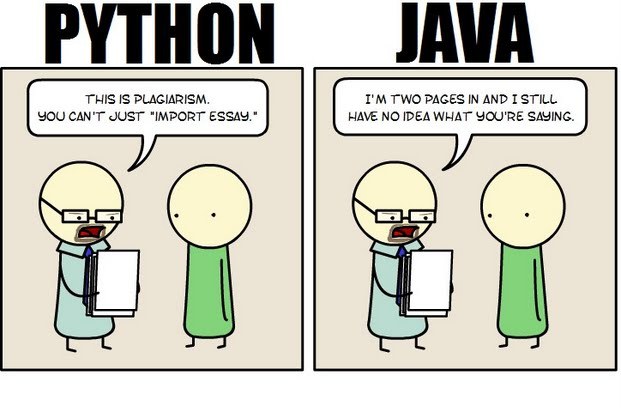 Java still has its place in the world of software development, but is it quickly becoming obsolete by the more dynamically enabled Python programming language? The issue is hotly contested by both sides of the debate. Java experts point out that Java is still being developed with more programmer friendly updates. Python users swear that Java can take up to ten times longer to develop. Managers that need to make the best decision for a company need concrete information so that an informed and rational decision can be made.
First, Java is a static typed language while Python is dynamically typed. Static typed languages require that each variable name must be tied to both a type and an object. Dynamically typed languages only require that a variable name only gets bound to an object. Immediately, this puts Python ahead of the game in terms of productivity since a static typed language requires several elements and can make errors in coding more likely.
Python uses a concise language while Java uses verbose language. Concise language, as the name suggests, gets straight to the point without extra words. Removing additional syntax can greatly reduce the amount of time required to program. A simple call in Java, such as the ever notorious "Hello, World" requires three several lines of coding while Python requires a single sentence. Java requires the use of checked exceptions. If the exceptions are not caught or thrown out then the code fails to compile. In terms of language, Python certainly has surpassed Java in terms of brevity.
Additionally, while Java's string handling capabilities have improved they haven't yet matched the sophistication of Python's. Web applications rely upon fast load times and extraneous code can increase user wait time. Python optimizes code in ways that Java doesn't, and this can make Python a more efficient language. However, Java does run faster than Python and this can be a significant advantage for programmers using Java. When you factor in the need for a compiler for Java applications the speed factor cancels itself out leaving Python and Java at an impasse.
While a programmer will continue to argue for the language that makes it easiest based on the programmer's current level of knowledge, new software compiled with Python takes less time and provides a simplified coding language that reduces the chance for errors. When things go right, Java works well and there are no problems. However, when errors get introduced into the code, it can become extremely time consuming to locate and correct those errors. Python generally uses less code to begin with and makes it easier and more efficient to work with.
Ultimately, both languages have their own strengths and weaknesses. For creating simple applications, Python provides a simpler and more effective application. Larger applications can benefit from Java and the verbosity of the code actually makes it more compatible with future versions. Python code has been known to break with new releases. Ultimately, Python works best as a type of connecting language to conduct quick and dirty work that would be too intensive when using Java alone. In this sense, Java is a low-level implementation language. While both languages are continuing to develop, it's unlikely that one language will surpass the other for all programming needs in the near future.
Tech Life in Wisconsin
| Company Name | City | Industry | Secondary Industry |
|---|---|---|---|
| We Energies | Milwaukee | Energy and Utilities | Gas and Electric Utilities |
| Bemis Company, Inc. | Neenah | Manufacturing | Plastics and Rubber Manufacturing |
| Regal Beloit Corporation | Beloit | Manufacturing | Tools, Hardware and Light Machinery |
| Manitowoc Company, Inc | Manitowoc | Manufacturing | Heavy Machinery |
| Briggs and Stratton Corporation | Milwaukee | Manufacturing | Tools, Hardware and Light Machinery |
| Mortgage Guaranty Insurance Corporation (MGIC) | Milwaukee | Financial Services | Lending and Mortgage |
| A.O. Smith Corporation | Milwaukee | Manufacturing | Tools, Hardware and Light Machinery |
| Sentry Insurance | Stevens Point | Financial Services | Insurance and Risk Management |
| Rockwell Automation, Inc. | Milwaukee | Manufacturing | Tools, Hardware and Light Machinery |
| Bucyrus International, Inc. | South Milwaukee | Manufacturing | Heavy Machinery |
| Diversey, Inc. | Sturtevant | Manufacturing | Chemicals and Petrochemicals |
| Alliant Energy Corporation | Madison | Energy and Utilities | Gas and Electric Utilities |
| Plexus Corp. | Neenah | Manufacturing | Manufacturing Other |
| Spectrum Brands Holdings, Inc. | Madison | Manufacturing | Tools, Hardware and Light Machinery |
| Kohl's Corporation | Menomonee Falls | Retail | Department Stores |
| Snap-on Tools, Inc. | Kenosha | Manufacturing | Tools, Hardware and Light Machinery |
| Fiserv, Inc. | Brookfield | Software and Internet | Data Analytics, Management and Storage |
| CUNA Mutual Group | Madison | Financial Services | Insurance and Risk Management |
| Oshkosh Corporation | Oshkosh | Manufacturing | Heavy Machinery |
| Modine Manufacturing Company | Racine | Manufacturing | Manufacturing Other |
| Northwestern Mutual Life Insurance Company | Milwaukee | Financial Services | Insurance and Risk Management |
| Joy Global Inc. | Milwaukee | Manufacturing | Heavy Machinery |
| Harley-Davidson, Inc. | Milwaukee | Manufacturing | Automobiles, Boats and Motor Vehicles |
| American Family Insurance | Madison | Financial Services | Insurance and Risk Management |
| Johnson Controls, Inc. | Milwaukee | Manufacturing | Heavy Machinery |
| ManpowerGroup | Milwaukee | Business Services | HR and Recruiting Services |
training details locations, tags and why hsg
The Hartmann Software Group understands these issues and addresses them and others during any training engagement. Although no IT educational institution can guarantee career or application development success, HSG can get you closer to your goals at a far faster rate than self paced learning and, arguably, than the competition. Here are the reasons why we are so successful at teaching:
- Learn from the experts.
- We have provided software development and other IT related training to many major corporations in Wisconsin since 2002.
- Our educators have years of consulting and training experience; moreover, we require each trainer to have cross-discipline expertise i.e. be Java and .NET experts so that you get a broad understanding of how industry wide experts work and think.
- Discover tips and tricks about Ajax programming
- Get your questions answered by easy to follow, organized Ajax experts
- Get up to speed with vital Ajax programming tools
- Save on travel expenses by learning right from your desk or home office. Enroll in an online instructor led class. Nearly all of our classes are offered in this way.
- Prepare to hit the ground running for a new job or a new position
- See the big picture and have the instructor fill in the gaps
- We teach with sophisticated learning tools and provide excellent supporting course material
- Books and course material are provided in advance
- Get a book of your choice from the HSG Store as a gift from us when you register for a class
- Gain a lot of practical skills in a short amount of time
- We teach what we know…software
- We care…