
Microsoft SQL Server Training Classes in Honolulu, Hawaii
Learn Microsoft SQL Server in Honolulu, Hawaii and surrounding areas via our hands-on, expert led courses. All of our classes either are offered on an onsite, online or public instructor led basis. Here is a list of our current Microsoft SQL Server related training offerings in Honolulu, Hawaii: Microsoft SQL Server Training
Microsoft SQL Server Training Catalog
Course Directory [training on all levels]
- .NET Classes
- Agile/Scrum Classes
- AI Classes
- Ajax Classes
- Android and iPhone Programming Classes
- Azure Classes
- Blaze Advisor Classes
- C Programming Classes
- C# Programming Classes
- C++ Programming Classes
- Cisco Classes
- Cloud Classes
- CompTIA Classes
- Crystal Reports Classes
- Data Classes
- Design Patterns Classes
- DevOps Classes
- Foundations of Web Design & Web Authoring Classes
- Git, Jira, Wicket, Gradle, Tableau Classes
- IBM Classes
- Java Programming Classes
- JBoss Administration Classes
- JUnit, TDD, CPTC, Web Penetration Classes
- Linux Unix Classes
- Machine Learning Classes
- Microsoft Classes
- Microsoft Development Classes
- Microsoft SQL Server Classes
- Microsoft Team Foundation Server Classes
- Microsoft Windows Server Classes
- Oracle, MySQL, Cassandra, Hadoop Database Classes
- Perl Programming Classes
- Python Programming Classes
- Ruby Programming Classes
- SAS Classes
- Security Classes
- SharePoint Classes
- SOA Classes
- Tcl, Awk, Bash, Shell Classes
- UML Classes
- VMWare Classes
- Web Development Classes
- Web Services Classes
- Weblogic Administration Classes
- XML Classes
- OPENSHIFT ADMINISTRATION
19 October, 2026 - 21 October, 2026 - Enterprise Linux System Administration
21 September, 2026 - 25 September, 2026 - RED HAT ENTERPRISE LINUX SYSTEMS ADMIN I
26 October, 2026 - 30 October, 2026 - AWS Certified Machine Learning: Specialty (MLS-C01)
2 November, 2026 - 6 November, 2026 - RED HAT ENTERPRISE LINUX AUTOMATION WITH ANSIBLE
9 November, 2026 - 12 November, 2026 - See our complete public course listing
Blog Entries publications that: entertain, make you think, offer insight
You may use the camera application on a regular basis. Taking photos of family gatherings, of the scenery around you, or just a self-photo with you and your friends. But, as you may find out, pressing that picture button on the screen is not the easiest thing to do. You may not hit it when you attempt to press it, or you aren’t sure if you pressed it at all.
In a recent update by Apple, the iPhone can now take photos without the use of that button. Although you may continue to use it, an easier method to take photos would definitely be pressing your volume buttons. When you have everyone situated, and ready to take a picture, you don’t have to move your finger over to the camera button. Just put your finger on one of the volume keys on the left hand side of your phone, and press it, and your iPhone should take the picture! It’s just that easy.
One of the most recent updates to the iPhone, and more specifically the operating system that is packaged with the iPhone, iOS, brought one of the most fantastic and phenomenal updates ever: an update to Maps. Maps has been used as an application that provides an easy way to find routes, and (obviously) maps about certain areas, businesses in the local vicinity, and also leaving pins on favorited locations, or pins where you have explored, and for many other reasons. However, although Maps has always been a great way to travel with, it has always been redundant to travel with, also. When you used Maps a while ago, you had to route your map, and then manually click each next button as you reached each turn or freeway exit, and the like. So, if you had to turn left on a certain street, you had to tell your phone you had done so, so it would give you the next directions. As a result, it could become very dangerous to always have your phone out, looking at it, while you are on a high-speed freeway. But, the newest update solved that, and brought a great amount of new features.
Using Maps GPS
Using Maps is as easy as it gets. Most of the time, when you are using Maps, you are using it to search for a location, and finding a way to get there. To start off, let’s search for the nearest mall, and routes to get there. Simply search a nearby mall you know about, or search the general word “mall” by tapping on the top text box, and typing in mall, and searching. Pins will drop down on the screen, and locating the mall by zooming into certain streets and locations will help you find the mall you want. Once you find the mall you desire to go to, click on the blue arrow, and scroll down, and tap on the button that says “Directions To Here.”
As a result of tapping on that particular button, a new window should show up asking where your starting location is. On default, this location is your current location; if it is anything else, simply type in the starting location into the top address bar, such as your house. Once you are ready to go, tap on route, and you should be ready to go. Well, not exactly. One of the best features that has been implemented in the new system is suggested routes, and alternative routes. If you don’t like to drive on certain streets, or roads, the system provides you with different methods to get to your destination, which may avoid a road you don’t feel like driving on that certain day, or time, or you simply don’t want to take the freeway. It’s all okay, as Maps provides you with many different routes to take. Once you find the route you want (by tapping on the certain route’s outline), click start, and you should be ready to go. Make sure you turn up your volume so you can hear the directions!
Maps for Alternative Transportation
Sometimes we have to repeat ourselves before we are heard. Then again there are times where we have to perform a certain action the same way several times before we can carry on with what we want to do.
Repetition is the keyword here and for humans that is something we generally try to avoid. Yet our digital friends love repetition. They never get tired and they never get bored of doing the same thing over and over again countless times.
So it’s little wonder then that all modern programming languages give us various ways in which we can perform a certain action as many times as we need.
In python we have the for statement which gives us the power to loop over large collections of data very quickly and efficiently.
Information Technology is one of the most dynamic industries with new technologies surfacing frequently. In such a scenario, it can get intimidating for information technology professionals at all levels to keep abreast of the latest technology innovations worth investing time and resources into.
It can therefore get daunting for entry and mid-level IT professionals to decide which technologies they should potentially be developing skills. However, the biggest challenge comes for senior information technology professionals responsible for driving the IT strategy in their organizations.
It is therefore important to keep abreast of the latest technology trends and get them from reputable sources. Here are some of the ways to keep on top of the latest trends in Information Technology.
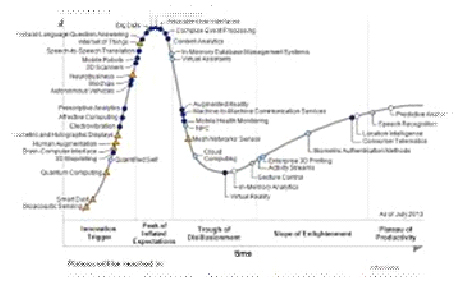
· Subscribe to leading Analyst Firms: If you work for a leading IT organization, chances are that you already have subscription to leading IT analyst firms notably Gartner and Forrester. These two firms are some of the most recognized analyst firms with extensive coverage on almost every enterprise technology including hardware and software. These Analyst firms frequently publish reports on global IT spending and trends that are based on primary research conducted on vendors and global CIOs & CTOs. However, subscription to these reports is very expensive and if you are a part of a small organization you may have issues securing access to these reports. One of the most important pieces of research published by these firms happens to be the Gartner Hype Cycle which plots leading technologies and their maturity curve.Even if you do not have access to Gartner research, you can hack your way by searching for “Gartner Hype Cycle” on Google Images and you will in most cases be able to see the plots similar to the one below
Tech Life in Hawaii
training details locations, tags and why hsg
The Hartmann Software Group understands these issues and addresses them and others during any training engagement. Although no IT educational institution can guarantee career or application development success, HSG can get you closer to your goals at a far faster rate than self paced learning and, arguably, than the competition. Here are the reasons why we are so successful at teaching:
- Learn from the experts.
- We have provided software development and other IT related training to many major corporations in Hawaii since 2002.
- Our educators have years of consulting and training experience; moreover, we require each trainer to have cross-discipline expertise i.e. be Java and .NET experts so that you get a broad understanding of how industry wide experts work and think.
- Discover tips and tricks about Microsoft SQL Server programming
- Get your questions answered by easy to follow, organized Microsoft SQL Server experts
- Get up to speed with vital Microsoft SQL Server programming tools
- Save on travel expenses by learning right from your desk or home office. Enroll in an online instructor led class. Nearly all of our classes are offered in this way.
- Prepare to hit the ground running for a new job or a new position
- See the big picture and have the instructor fill in the gaps
- We teach with sophisticated learning tools and provide excellent supporting course material
- Books and course material are provided in advance
- Get a book of your choice from the HSG Store as a gift from us when you register for a class
- Gain a lot of practical skills in a short amount of time
- We teach what we know…software
- We care…