
Microsoft Windows Server Training Classes in Las Vegas, Nevada
Learn Microsoft Windows Server in Las Vegas, Nevada and surrounding areas via our hands-on, expert led courses. All of our classes either are offered on an onsite, online or public instructor led basis. Here is a list of our current Microsoft Windows Server related training offerings in Las Vegas, Nevada: Microsoft Windows Server Training
Microsoft Windows Server Training Catalog
Course Directory [training on all levels]
- .NET Classes
- Agile/Scrum Classes
- AI Classes
- Ajax Classes
- Android and iPhone Programming Classes
- Azure Classes
- Blaze Advisor Classes
- C Programming Classes
- C# Programming Classes
- C++ Programming Classes
- Cisco Classes
- Cloud Classes
- CompTIA Classes
- Crystal Reports Classes
- Data Classes
- Design Patterns Classes
- DevOps Classes
- Foundations of Web Design & Web Authoring Classes
- Git, Jira, Wicket, Gradle, Tableau Classes
- IBM Classes
- Java Programming Classes
- JBoss Administration Classes
- JUnit, TDD, CPTC, Web Penetration Classes
- Linux Unix Classes
- Machine Learning Classes
- Microsoft Classes
- Microsoft Development Classes
- Microsoft SQL Server Classes
- Microsoft Team Foundation Server Classes
- Microsoft Windows Server Classes
- Oracle, MySQL, Cassandra, Hadoop Database Classes
- Perl Programming Classes
- Python Programming Classes
- Ruby Programming Classes
- SAS Classes
- Security Classes
- SharePoint Classes
- SOA Classes
- Tcl, Awk, Bash, Shell Classes
- UML Classes
- VMWare Classes
- Web Development Classes
- Web Services Classes
- Weblogic Administration Classes
- XML Classes
- Linux Fundaments GL120
14 September, 2026 - 18 September, 2026 - RED HAT ENTERPRISE LINUX SYSTEMS ADMIN I
26 October, 2026 - 30 October, 2026 - ASP.NET Core MVC, Rev. 8.0
19 October, 2026 - 20 October, 2026 - RED HAT ENTERPRISE LINUX SYSTEMS ADMIN II
2 November, 2026 - 5 November, 2026 - RED HAT ENTERPRISE LINUX AUTOMATION WITH ANSIBLE
9 November, 2026 - 12 November, 2026 - See our complete public course listing
Blog Entries publications that: entertain, make you think, offer insight
Information Technology is one of the most dynamic industries with new technologies surfacing frequently. In such a scenario, it can get intimidating for information technology professionals at all levels to keep abreast of the latest technology innovations worth investing time and resources into.
It can therefore get daunting for entry and mid-level IT professionals to decide which technologies they should potentially be developing skills. However, the biggest challenge comes for senior information technology professionals responsible for driving the IT strategy in their organizations.
It is therefore important to keep abreast of the latest technology trends and get them from reputable sources. Here are some of the ways to keep on top of the latest trends in Information Technology.
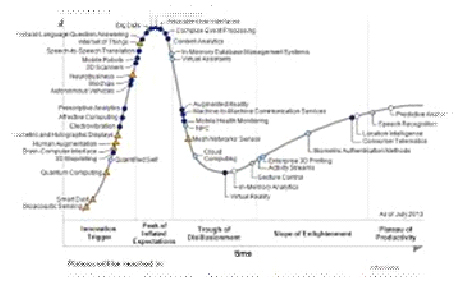
· Subscribe to leading Analyst Firms: If you work for a leading IT organization, chances are that you already have subscription to leading IT analyst firms notably Gartner and Forrester. These two firms are some of the most recognized analyst firms with extensive coverage on almost every enterprise technology including hardware and software. These Analyst firms frequently publish reports on global IT spending and trends that are based on primary research conducted on vendors and global CIOs & CTOs. However, subscription to these reports is very expensive and if you are a part of a small organization you may have issues securing access to these reports. One of the most important pieces of research published by these firms happens to be the Gartner Hype Cycle which plots leading technologies and their maturity curve.Even if you do not have access to Gartner research, you can hack your way by searching for “Gartner Hype Cycle” on Google Images and you will in most cases be able to see the plots similar to the one below
Another blanket article about the pros and cons of Direct to Consumer (D2C) isn’t needed, I know. By now, we all know the rules for how this model enters a market: its disruption fights any given sector’s established sales model, a fuzzy compromise is temporarily met, and the lean innovator always wins out in the end.
That’s exactly how it played out in the music industry when Apple and record companies created a digital storefront in iTunes to usher music sales into the online era. What now appears to have been a stopgap compromise, iTunes was the standard model for 5-6 years until consumers realized there was no point in purchasing and owning digital media when internet speeds increased and they could listen to it for free through a music streaming service. In 2013, streaming models are the new music consumption standard. Netflix is nearly parallel in the film and TV world, though they’ve done a better job keeping it all under one roof. Apple mastered retail sales so well that the majority of Apple products, when bought in-person, are bought at an Apple store. That’s even more impressive when you consider how few Apple stores there are in the U.S. (253) compared to big box electronics stores that sell Apple products like Best Buy (1,100) Yet while some industries have implemented a D2C approach to great success, others haven’t even dipped a toe in the D2C pool, most notably the auto industry.
What got me thinking about this topic is the recent flurry of attention Tesla Motors has received for its D2C model. It all came to a head at the beginning of July when a petition on whitehouse.gov to allow Tesla to sell directly to consumers in all 50 states reached the 100,000 signatures required for administration comment. As you might imagine, many powerful car dealership owners armed with lobbyists have made a big stink about Elon Musk, Tesla’s CEO and Product Architect, choosing to sidestep the traditional supply chain and instead opting to sell directly to their customers through their website. These dealership owners say that they’re against the idea because they want to protect consumers, but the real motive is that they want to defend their right to exist (and who wouldn’t?). They essentially have a monopoly at their position in the sales process, and they want to keep it that way. More frightening for the dealerships is the possibility that once Tesla starts selling directly to consumers, so will the big three automakers, and they fear that would be the end of the road for their business. Interestingly enough, the big three flirted with the idea of D2C in the early 90’s before they were met with fierce backlash from dealerships. I’m sure the dealership community has no interest in mounting a fight like that again.
To say that the laws preventing Tesla from selling online are peripherally relevant would be a compliment. By and large, the laws the dealerships point to fall under the umbrella of “Franchise Laws” that were put in place at the dawn of car sales to protect franchisees against manufacturers opening their own stores and undercutting the franchise that had invested so much to sell the manufacturer’s cars. There’s certainly a need for those laws to exist, because no owner of a dealership selling Jeeps wants Chrysler to open their own dealership next door and sell them for substantially less. However, because Tesla is independently owned and isn’t currently selling their cars through any third party dealership, this law doesn’t really apply to them. Until their cars are sold through independent dealerships, they’re incapable of undercutting anyone by implementing D2C structure.
We’re often asked by companies about how they can get the most value from Agile/Scrum practices. More specifically, they want to know if they are being as effective as best they possibly can be by using the Scrum framework for their explicit needs.
The other objective for individuals is determining if it necessary to be certified in order to be effective in the Agile Scrum world? In short, a good Scrum Master must understand four things: the business they work in, the technology they work with, the Agile and Scrum principles, and, most importantly, people! Based on these facts, Scrum Master Certification is not enough – real life experience and a bit of soft skills should be part and parcel of their training. For organizations, the main goal is to understand industry best practices when adopting and applying agile principles, to build strong teams, understand and distill business needs into software requirements.
In terms of getting a good grip on training for Agile/Scrum, one can opt to pursue a certification in Scrum (CSM) Certified Scrum Master for personal reasons or for a job requirement. Or, one can simply opt to learn the benefits and pitfalls of the methodology and decide the best approach for them.
There are different ways to get started with Agile training. Below are two of the most common paths to Agile our students take.
Studying a functional programming language is a good way to discover new approaches to problems and different ways of thinking. Although functional programming has much in common with logic and imperative programming, it uses unique abstractions and a different toolset for solving problems. Likewise, many current mainstream languages are beginning to pick up and integrate various techniques and features from functional programming.
Many authorities feel that Haskell is a great introductory language for learning functional programming. However, there are various other possibilities, including Scheme, F#, Scala, Clojure, Erlang and others.
Haskell is widely recognized as a beautiful, concise and high-performing programming language. It is statically typed and supports various cool features that augment language expressivity, including currying and pattern matching. In addition to monads, the language support a type-class system based on methods; this enables higher encapsulation and abstraction. Advanced Haskell will require learning about combinators, lambda calculus and category theory. Haskell allows programmers to create extremely elegant solutions.
Scheme is another good learning language -- it has an extensive history in academia and a vast body of instructional documents. Based on the oldest functional language -- Lisp -- Scheme is actually very small and elegant. Studying Scheme will allow the programmer to master iteration and recursion, lambda functions and first-class functions, closures, and bottom-up design.
Supported by Microsoft and growing in popularity, F# is a multi-paradigm, functional-first programming language that derives from ML and incorporates features from numerous languages, including OCaml, Scala, Haskell and Erlang. F# is described as a functional language that also supports object-oriented and imperative techniques. It is a .NET family member. F# allows the programmer to create succinct, type-safe, expressive and efficient solutions. It excels at parallel I/O and parallel CPU programming, data-oriented programming, and algorithmic development.
Scala is a general-purpose programming and scripting language that is both functional and object-oriented. It has strong static types and supports numerous functional language techniques such as pattern matching, lazy evaluation, currying, algebraic types, immutability and tail recursion. Scala -- from "scalable language" -- enables coders to write extremely concise source code. The code is compiled into Java bytecode and executes on the ubiquitous JVM (Java virtual machine).
Like Scala, Clojure also runs on the Java virtual machine. Because it is based on Lisp, it treats code like data and supports macros. Clojure's immutability features and time-progression constructs enable the creation of robust multithreaded programs.
Erlang is a highly concurrent language and runtime. Initially created by Ericsson to enable real-time, fault-tolerant, distributed applications, Erlang code can be altered without halting the system. The language has a functional subset with single assignment, dynamic typing, and eager evaluation. Erlang has powerful explicit support for concurrent processes.
Tech Life in Nevada
| Company Name | City | Industry | Secondary Industry |
|---|---|---|---|
| Wynn Resorts, Limited | Las Vegas | Travel, Recreation and Leisure | Gambling and Gaming Industries |
| Las Vegas Sands Corp. | Las Vegas | Travel, Recreation and Leisure | Resorts and Casinos |
| Southwest Gas Corporation | Las Vegas | Energy and Utilities | Gas and Electric Utilities |
| NV Energy Inc | Las Vegas | Energy and Utilities | Gas and Electric Utilities |
| AMERCO | Reno | Transportation and Storage | Moving Companies and Services |
| Boyd Gaming Corporation | Las Vegas | Travel, Recreation and Leisure | Gambling and Gaming Industries |
| International Gaming Technology Inc. | Reno | Travel, Recreation and Leisure | Gambling and Gaming Industries |
| Caesars Entertainment Corporation | Las Vegas | Travel, Recreation and Leisure | Resorts and Casinos |
| MGM Resorts International | Las Vegas | Travel, Recreation and Leisure | Hotels, Motels and Lodging |
training details locations, tags and why hsg
The Hartmann Software Group understands these issues and addresses them and others during any training engagement. Although no IT educational institution can guarantee career or application development success, HSG can get you closer to your goals at a far faster rate than self paced learning and, arguably, than the competition. Here are the reasons why we are so successful at teaching:
- Learn from the experts.
- We have provided software development and other IT related training to many major corporations in Nevada since 2002.
- Our educators have years of consulting and training experience; moreover, we require each trainer to have cross-discipline expertise i.e. be Java and .NET experts so that you get a broad understanding of how industry wide experts work and think.
- Discover tips and tricks about Microsoft Windows Server programming
- Get your questions answered by easy to follow, organized Microsoft Windows Server experts
- Get up to speed with vital Microsoft Windows Server programming tools
- Save on travel expenses by learning right from your desk or home office. Enroll in an online instructor led class. Nearly all of our classes are offered in this way.
- Prepare to hit the ground running for a new job or a new position
- See the big picture and have the instructor fill in the gaps
- We teach with sophisticated learning tools and provide excellent supporting course material
- Books and course material are provided in advance
- Get a book of your choice from the HSG Store as a gift from us when you register for a class
- Gain a lot of practical skills in a short amount of time
- We teach what we know…software
- We care…