
Security Training Classes in Gilbert, Arizona
Learn Security in Gilbert, Arizona and surrounding areas via our hands-on, expert led courses. All of our classes either are offered on an onsite, online or public instructor led basis. Here is a list of our current Security related training offerings in Gilbert, Arizona: Security Training
Security Training Catalog
AWS Classes
JUnit, TDD, CPTC, Web Penetration Classes
Course Directory [training on all levels]
- .NET Classes
- Agile/Scrum Classes
- AI Classes
- Ajax Classes
- Android and iPhone Programming Classes
- Azure Classes
- Blaze Advisor Classes
- C Programming Classes
- C# Programming Classes
- C++ Programming Classes
- Cisco Classes
- Cloud Classes
- CompTIA Classes
- Crystal Reports Classes
- Data Classes
- Design Patterns Classes
- DevOps Classes
- Foundations of Web Design & Web Authoring Classes
- Git, Jira, Wicket, Gradle, Tableau Classes
- IBM Classes
- Java Programming Classes
- JBoss Administration Classes
- JUnit, TDD, CPTC, Web Penetration Classes
- Linux Unix Classes
- Machine Learning Classes
- Microsoft Classes
- Microsoft Development Classes
- Microsoft SQL Server Classes
- Microsoft Team Foundation Server Classes
- Microsoft Windows Server Classes
- Oracle, MySQL, Cassandra, Hadoop Database Classes
- Perl Programming Classes
- Python Programming Classes
- Ruby Programming Classes
- SAS Classes
- Security Classes
- SharePoint Classes
- SOA Classes
- Tcl, Awk, Bash, Shell Classes
- UML Classes
- VMWare Classes
- Web Development Classes
- Web Services Classes
- Weblogic Administration Classes
- XML Classes
- RED HAT ENTERPRISE LINUX SYSTEMS ADMIN I
26 October, 2026 - 30 October, 2026 - OPENSHIFT ADMINISTRATION
19 October, 2026 - 21 October, 2026 - RED HAT ENTERPRISE LINUX AUTOMATION WITH ANSIBLE
9 November, 2026 - 12 November, 2026 - ASP.NET Core MVC, Rev. 8.0
19 October, 2026 - 20 October, 2026 - AWS Certified Machine Learning: Specialty (MLS-C01)
2 November, 2026 - 6 November, 2026 - See our complete public course listing
Blog Entries publications that: entertain, make you think, offer insight
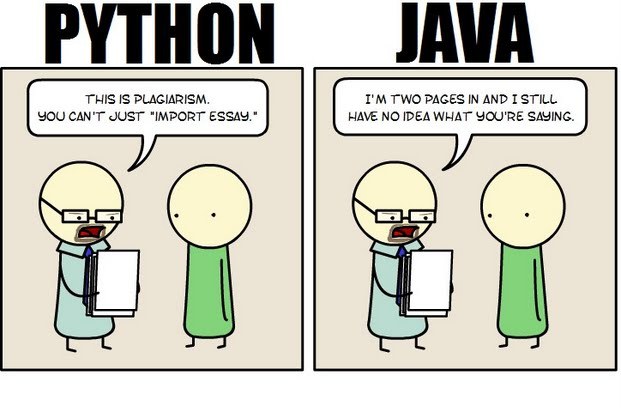 Java still has its place in the world of software development, but is it quickly becoming obsolete by the more dynamically enabled Python programming language? The issue is hotly contested by both sides of the debate. Java experts point out that Java is still being developed with more programmer friendly updates. Python users swear that Java can take up to ten times longer to develop. Managers that need to make the best decision for a company need concrete information so that an informed and rational decision can be made.
First, Java is a static typed language while Python is dynamically typed. Static typed languages require that each variable name must be tied to both a type and an object. Dynamically typed languages only require that a variable name only gets bound to an object. Immediately, this puts Python ahead of the game in terms of productivity since a static typed language requires several elements and can make errors in coding more likely.
Python uses a concise language while Java uses verbose language. Concise language, as the name suggests, gets straight to the point without extra words. Removing additional syntax can greatly reduce the amount of time required to program. A simple call in Java, such as the ever notorious "Hello, World" requires three several lines of coding while Python requires a single sentence. Java requires the use of checked exceptions. If the exceptions are not caught or thrown out then the code fails to compile. In terms of language, Python certainly has surpassed Java in terms of brevity.
Additionally, while Java's string handling capabilities have improved they haven't yet matched the sophistication of Python's. Web applications rely upon fast load times and extraneous code can increase user wait time. Python optimizes code in ways that Java doesn't, and this can make Python a more efficient language. However, Java does run faster than Python and this can be a significant advantage for programmers using Java. When you factor in the need for a compiler for Java applications the speed factor cancels itself out leaving Python and Java at an impasse.
While a programmer will continue to argue for the language that makes it easiest based on the programmer's current level of knowledge, new software compiled with Python takes less time and provides a simplified coding language that reduces the chance for errors. When things go right, Java works well and there are no problems. However, when errors get introduced into the code, it can become extremely time consuming to locate and correct those errors. Python generally uses less code to begin with and makes it easier and more efficient to work with.
Ultimately, both languages have their own strengths and weaknesses. For creating simple applications, Python provides a simpler and more effective application. Larger applications can benefit from Java and the verbosity of the code actually makes it more compatible with future versions. Python code has been known to break with new releases. Ultimately, Python works best as a type of connecting language to conduct quick and dirty work that would be too intensive when using Java alone. In this sense, Java is a low-level implementation language. While both languages are continuing to develop, it's unlikely that one language will surpass the other for all programming needs in the near future.
It is said that spoken languages shape thoughts by their inclusion and exclusion of concepts, and by structuring them in different ways. Similarly, programming languages shape solutions by making some tasks easier and others less aesthetic. Using F# instead of C# reshapes software projects in ways that prefer certain development styles and outcomes, changing what is possible and how it is achieved.
F# is a functional language from Microsoft's research division. While once relegated to the land of impractical academia, the principles espoused by functional programming are beginning to garner mainstream appeal.
As its name implies, functions are first-class citizens in functional programming. Blocks of code can be stored in variables, passed to other functions, and infinitely composed into higher-order functions, encouraging cleaner abstractions and easier testing. While it has long been possible to store and pass code, F#'s clean syntax for higher-order functions encourages them as a solution to any problem seeking an abstraction.
F# also encourages immutability. Instead of maintaining state in variables, functional programming with F# models programs as a series of functions converting inputs to outputs. While this introduces complications for those used to imperative styles, the benefits of immutability mesh well with many current developments best practices.
For instance, if functions are pure, handling only immutable data and exhibiting no side effects, then testing is vastly simplified. It is very easy to test that a specific block of code always returns the same value given the same inputs, and by modeling code as a series of immutable functions, it becomes possible to gain a deep and highly precise set of guarantees that software will behave exactly as written.
Further, if execution flow is exclusively a matter of routing function inputs to outputs, then concurrency is vastly simplified. By shifting away from mutable state to immutable functions, the need for locks and semaphores is vastly reduced if not entirely eliminated, and multi-processor development is almost effortless in many cases.
Type inference is another powerful feature of many functional languages. It is often unnecessary to specify argument and return types, since any modern compiler can infer them automatically. F# brings this feature to most areas of the language, making F# feel less like a statically-typed language and more like Ruby or Python. F# also eliminates noise like braces, explicit returns, and other bits of ceremony that make languages feel cumbersome.
Functional programming with F# makes it possible to write concise, easily testable code that is simpler to parallelize and reason about. However, strict functional styles often require imperative developers to learn new ways of thinking that are not as intuitive. Fortunately, F# makes it possible to incrementally change habits over time. Thanks to its hybrid object-oriented and functional nature, and its clean interoperability with the .net platform, F# developers can gradually shift to a more functional mindset while still using the algorithms and libraries with which they are most familiar.
Related F# Resources:
 Big data is now in an incredibly important part of how many major businesses function. Data analysis, or the finding of facts from large volumes of data, helps businesses make many of their important decisions. Companies that conduct business on a national or international scale rely on big data in order to plot the general direction of their business. The concept of big data can be very confusing due to the sheer scale of information involved. By following a few simple guidelines, even the layman can understand big data and its impacts on everyday life.
What Exactly is Big Data?
Just about everyone can understand the concept of data. Data is information, and information is everywhere in the modern world. Anytime you use any piece of technology you are making use of data. Anytime you read a book, skim the newspaper or listen to music you are also making use of data. Your brain interprets and organizes data constantly from your senses and your thoughts.
Big data, much like its name infers, simply describes this same data on a large sale. The internet allowed the streaming, sharing and collecting of data on a scale never before imaginable and storage technology has allowed ever increasing hoards of data to be accumulated. In order for something to be considered “big data” it must be at least 10 terabytes or more of information. To put that in perspective, consider that 10 terabytes represents the entire printed collection of material in the Library of Congress. What’s even more remarkable is that many businesses work with far more than the minimum 10 terabytes of data. UPS stores over 16 petabytes of data about its packages and customers. That’s 16,000 terabytes or the equivalent to 1,600 printed libraries of congress. The sheer amount of that data is nearly impossible for a human to comprehend, and analysis of this data is only possible with computers.
How do Big Data Companies Emerge?
All of this information comes from everywhere on the internet. The majority of the useful data includes customer information, search engine logs, and entries on social media networks to name a few. This data is constantly generated by the internet at insane rates. Specified computers and software programs are created and operated by big data companies that collect and sort this information. These programs and hardware are so sophisticated and so specialized that entire companies can be dedicated to analyzing this data and then selling it to other companies. The raw data is distilled down into manageable reports that company executives can make use of when handling business decisions.
The Top Five:
These are the five biggest companies, according to Forbes, in the business of selling either raw data reports or analytics programs that help companies to compile their own reports.
1. Splunk
Splunk is currently valued at $186 million. It is essentially a program service that allows companies to turn their own raw data collections into usable information.
2. Opera Solutions
Opera Solutions is valued at $118 million. It serves as a data science service that helps other companies to manage the raw data that pertains to them. They can offer either direct consultation or cloud-based service.
3. Mu Sigma
Mu Sigma is valued at $114 million. It is a slightly smaller version of Opera Solutions, offering essentially the same types of services.
4. Palantir
Palantir is valued at $78 million. It offers data analysis software to companies so they can manage their own raw data analysis.
5. Cloudera
Cloudera is valued at $61 million. It offers services, software and training specifically related to the Apahce Hadoop-based programs.
The software and services provided by these companies impact nearly all major businesses, industries and products. They impact what business offer, where they offer them and how they advertise them to consumers. Every advertisement, new store opening or creation of a new product is at least somewhat related to big data analysis. It is the directional force of modern business.
Sources:
http://www.sas.com/en_us/insights/big-data/what-is-big-data.html
http://www.forbes.com/sites/gilpress/2013/02/22/top-ten-big-data-pure-plays/
http://www.whatsabyte.com/
Related:
Top Innovative Open Source Projects Making Waves in The Technology World
Is the U.S. the Leading Software Development Country?
How to Keep On Top Of the Latest Trends in Information Technology
One of the biggest challenges in pursuing a career in software development is to figure out which language you want to work. In addition to commonly used software programming languages like C, C++, Java a lot of new programming languages such as Python, Ruby on Rails have surfaced especially because they are used by a lot of consumer based start-ups these days.
With so many front and back end languages, the choice of learning Java is a failsafe decision and mastering Java can ensure that you have a bright future in software programming.
What is Java
Java is a computer programming language that is designed to be platform independent meaning that the language can virtually run on any hardware platform. This platform independence and an object oriented framework make Java the preferred language of development especially for client-server web applications.
Tech Life in Arizona
| Company Name | City | Industry | Secondary Industry |
|---|---|---|---|
| Insight Enterprises, Inc. | Tempe | Computers and Electronics | IT and Network Services and Support |
| First Solar, Inc. | Tempe | Energy and Utilities | Alternative Energy Sources |
| Republic Services Inc | Phoenix | Energy and Utilities | Waste Management and Recycling |
| Pinnacle West Capital Corporation | Phoenix | Energy and Utilities | Gas and Electric Utilities |
| Amkor Technology, Inc. | Chandler | Computers and Electronics | Semiconductor and Microchip Manufacturing |
| Freeport-McMoRan Copper and Gold | Phoenix | Agriculture and Mining | Mining and Quarrying |
| US Airways Group, Inc. | Tempe | Travel, Recreation and Leisure | Passenger Airlines |
| PetSmart, Inc. | Phoenix | Retail | Retail Other |
| Avnet, Inc. | Phoenix | Computers and Electronics | Instruments and Controls |
| ON Semiconductor Corporation | Phoenix | Computers and Electronics | Semiconductor and Microchip Manufacturing |
training details locations, tags and why hsg
The Hartmann Software Group understands these issues and addresses them and others during any training engagement. Although no IT educational institution can guarantee career or application development success, HSG can get you closer to your goals at a far faster rate than self paced learning and, arguably, than the competition. Here are the reasons why we are so successful at teaching:
- Learn from the experts.
- We have provided software development and other IT related training to many major corporations in Arizona since 2002.
- Our educators have years of consulting and training experience; moreover, we require each trainer to have cross-discipline expertise i.e. be Java and .NET experts so that you get a broad understanding of how industry wide experts work and think.
- Discover tips and tricks about Security programming
- Get your questions answered by easy to follow, organized Security experts
- Get up to speed with vital Security programming tools
- Save on travel expenses by learning right from your desk or home office. Enroll in an online instructor led class. Nearly all of our classes are offered in this way.
- Prepare to hit the ground running for a new job or a new position
- See the big picture and have the instructor fill in the gaps
- We teach with sophisticated learning tools and provide excellent supporting course material
- Books and course material are provided in advance
- Get a book of your choice from the HSG Store as a gift from us when you register for a class
- Gain a lot of practical skills in a short amount of time
- We teach what we know…software
- We care…