
Microsoft SQL Server Training Classes in Honolulu, Hawaii
Learn Microsoft SQL Server in Honolulu, Hawaii and surrounding areas via our hands-on, expert led courses. All of our classes either are offered on an onsite, online or public instructor led basis. Here is a list of our current Microsoft SQL Server related training offerings in Honolulu, Hawaii: Microsoft SQL Server Training
Microsoft SQL Server Training Catalog
Course Directory [training on all levels]
- .NET Classes
- Agile/Scrum Classes
- AI Classes
- Ajax Classes
- Android and iPhone Programming Classes
- Azure Classes
- Blaze Advisor Classes
- C Programming Classes
- C# Programming Classes
- C++ Programming Classes
- Cisco Classes
- Cloud Classes
- CompTIA Classes
- Crystal Reports Classes
- Data Classes
- Design Patterns Classes
- DevOps Classes
- Foundations of Web Design & Web Authoring Classes
- Git, Jira, Wicket, Gradle, Tableau Classes
- IBM Classes
- Java Programming Classes
- JBoss Administration Classes
- JUnit, TDD, CPTC, Web Penetration Classes
- Linux Unix Classes
- Machine Learning Classes
- Microsoft Classes
- Microsoft Development Classes
- Microsoft SQL Server Classes
- Microsoft Team Foundation Server Classes
- Microsoft Windows Server Classes
- Oracle, MySQL, Cassandra, Hadoop Database Classes
- Perl Programming Classes
- Python Programming Classes
- Ruby Programming Classes
- SAS Classes
- Security Classes
- SharePoint Classes
- SOA Classes
- Tcl, Awk, Bash, Shell Classes
- UML Classes
- VMWare Classes
- Web Development Classes
- Web Services Classes
- Weblogic Administration Classes
- XML Classes
- ASP.NET Core MVC, Rev. 8.0
19 October, 2026 - 20 October, 2026 - RED HAT ENTERPRISE LINUX SYSTEMS ADMIN II
2 November, 2026 - 5 November, 2026 - Linux Fundaments GL120
14 September, 2026 - 18 September, 2026 - Linux Troubleshooting
31 August, 2026 - 4 September, 2026 - Enterprise Linux System Administration
21 September, 2026 - 25 September, 2026 - See our complete public course listing
Blog Entries publications that: entertain, make you think, offer insight
 People are optimistic about problem solving, but in most cases this is easier said than done. How do you do it?
In Adobe’s 2016 global study on creativity in business, 96% of people identified creativity as essential to their success, both in terms of their income and the value they bring to the world. Moreover, 78% wished they were capable of thinking differently, believing that they would progress through their careers more quickly if they did.
According to Malcom Gladwell, the world's most successful people have one thing in common: they think differently from most everyone else. In his book, How Successful People Think, Malcom opens with the following: “Good thinkers are always in demand. A person who knows how may always have a job, but the person who knows why will always be his boss. Good thinkers solve problems, they never lack ideas that can build an organization, and they always have hope for a better future”
Too often we attribute creative and “different” thinking to natural, innate characteristics that belong only to the lucky. The truth is that you can study how ridiculously successful people think and incorporate their approach into your world.
Snippets and Quotes from Tech Innovators.
A whole new world was thrown wide open with the advent of the concept of open source. The biggest advantage of open source projects is the easy availability of the source code and also the rights to tweak it or modify the code as we deem fit.
Listed below are some top open source projects that are making waves with their innovative ideas at this moment.
ProjectLibre
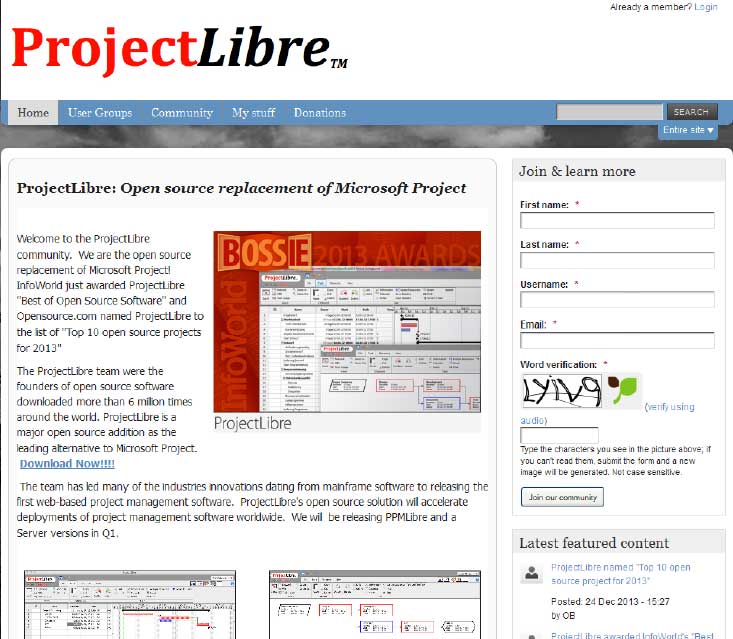 Project Libre is the open source replacement of Microsoft Project. It was one among the top 10 open source projects of 2013. With over 6 million downloads; it has most certainly captured the imagination of people around the world. Details of project Libre could be found at http://www.projectlibre.org/ . Project Libre has separate release for mainframes. It also has a web based version which further increases its overall appeal. One of the main advantages is that it has a list of tasks that can be tracked to closure. It can also be used in conjunction with LibreOffice to provide a great set of tools to the team leaders.
Diaspora
One of the most significant developments of mankind has been the art of writing. The earliest type of writing was in the form of graffiti and paintings on rocks and walls of caves. The first people who engaged in writing are reported to have been Sumerians and the Egyptians around 3500-3200 BC.[i] Early writing of this type was in the form of cuneiform and hieroglyphics. After that, writing emerged in different styles and form per the different societies and differences in expression.
Words are magical. They have preserved records of civilizations. They express desires and dreams and thoughts. But why write at all? What was or is the motive for writing? People write for different reasons. Some write because they have something to say; something to share with others, to inform. Others write to share their feelings.
George Orwell claimed there are four main reasons why people write as depicted below:
· Sheer Egoism: According to this concept, people write because they want to be talked about; they want to reveal their cleverness. People who are motivated by sheer egoism desire to be counted among the top crust of humanity such as scientists, artists, politicians, lawyers and successful businessmen who are always putting their thoughts in print.

Recently, I asked my friend, Ray, to list those he believes are the top 10 most forward thinkers in the IT industry. Below is the list he generated.
Like most smart people, Ray gets his information from institutions such as the New York Times, the Wall Street Journal, the Huffington Post, Ted Talks ... Ray is not an IT expert; he is, however, a marketer: the type that has an opinion on everything and is all too willing to share it. Unfortunately, many of his opinions are based upon the writings/editorials of those attempting to appeal to the reading level of an 8th grader. I suppose it could be worse. He could be referencing Yahoo News, where important stories get priority placement such as when the voluptuous Kate Upton holds a computer close to her breasts.
Before you read further, note that missing from this list and not credited are innovators: Bill Joy, Dennis Ritchie, Linus Torvalds, Alan Turing, Edward Howard Armstrong, Peter Andreas Grunberg and Albert Fent, Gottfried Wilhelm Leibniz/Hermann Grassmann ... You know the type: the type of individual who burns the midnight oil and rarely, if ever, guffaws over their discoveries or achievements.
Tech Life in Hawaii
training details locations, tags and why hsg
The Hartmann Software Group understands these issues and addresses them and others during any training engagement. Although no IT educational institution can guarantee career or application development success, HSG can get you closer to your goals at a far faster rate than self paced learning and, arguably, than the competition. Here are the reasons why we are so successful at teaching:
- Learn from the experts.
- We have provided software development and other IT related training to many major corporations in Hawaii since 2002.
- Our educators have years of consulting and training experience; moreover, we require each trainer to have cross-discipline expertise i.e. be Java and .NET experts so that you get a broad understanding of how industry wide experts work and think.
- Discover tips and tricks about Microsoft SQL Server programming
- Get your questions answered by easy to follow, organized Microsoft SQL Server experts
- Get up to speed with vital Microsoft SQL Server programming tools
- Save on travel expenses by learning right from your desk or home office. Enroll in an online instructor led class. Nearly all of our classes are offered in this way.
- Prepare to hit the ground running for a new job or a new position
- See the big picture and have the instructor fill in the gaps
- We teach with sophisticated learning tools and provide excellent supporting course material
- Books and course material are provided in advance
- Get a book of your choice from the HSG Store as a gift from us when you register for a class
- Gain a lot of practical skills in a short amount of time
- We teach what we know…software
- We care…